Create APA™ Format Document Using Microsoft Word

The purpose of this tutorial is to guide you in setting up your APA™ format document using Microsoft Word. Whether you prefer to simply download the template and get started, or follow step-by-step directions, I've got you covered! This can be achieved using any of the three methods outlined below.
Method 1: Simply download the pre-configured template
- Download APA™ format template (.docx)
- Open the document in Word and start writing your essay.
Method 2: Utilize Word's built-in template
-
Open Microsoft Word
Type “apa” into the search box. This will display a template that is provided by Microsoft for you to use freely.
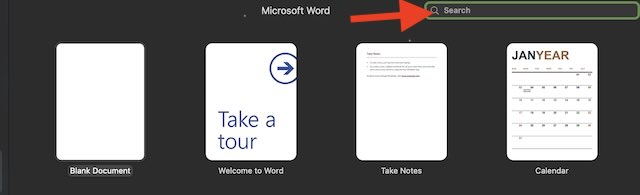
A screenshot showing where to type 'APA' into the search box. -
Click on the template titled 'Student APA Style paper 7th edition'.
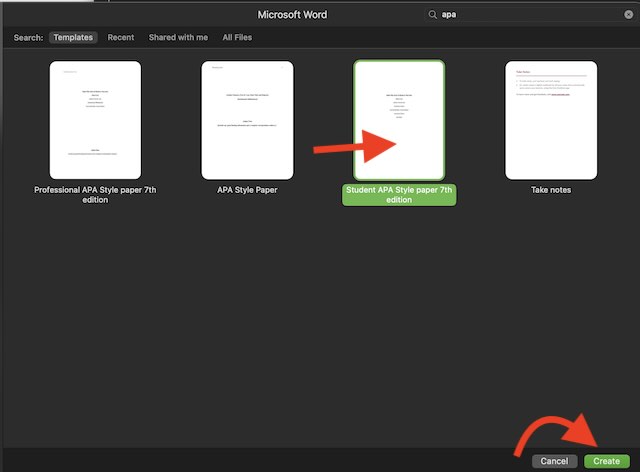
A screenshot indicating which template to use. Make sure to File “Save As” to save the document on your computer.
Begin writing your essay. Many of the pages in this document may not be necessary for most students, so please consult your instructor to confirm their specific requirements. For example, I was only required to use the title page, essay body, and references page. Some instructors may also request an 'Abstract' page. Knowing what is required ahead of time will help you set yourself up for success!
Method 3: The slow and inconvenient way
Open a blank document in Microsoft Word.
-
On the first page, type your essay title, your name, the name of the class, your instructor's name, and the essay due date.

A screenshot demonstrating how to set up the first page. Select all the text in your document using the mouse or by pressing Command (⌘) + A on Mac or Ctrl + A on Windows. Once the text is selected, set the proper font settings. Change the font to 'Times New Roman' and set the font size to '12'.
-
With the text still selected, open the paragraph settings by clicking 'Format' 'Paragraph'.
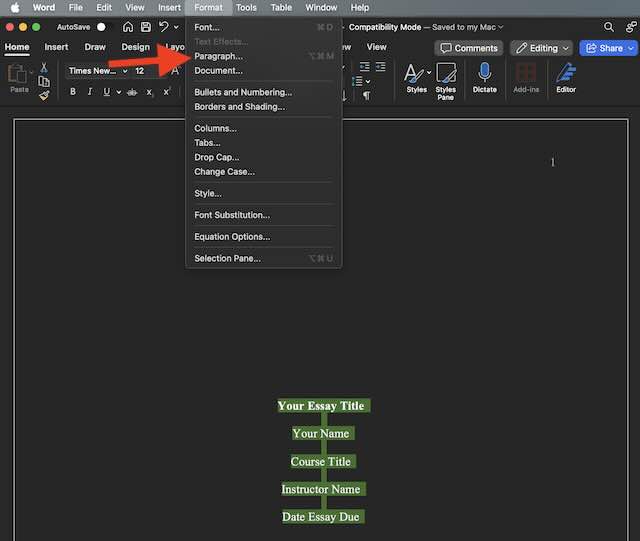
A screenshot showing how to access the paragraph settings.
Proceed to the next page to continue with the rest of this tutorial
American Psychological Association (APA), are registered trademarks of the American Psychological Association.